
Your regional director is presenting the Q3 roadmap from the far end of a 20-foot boardroom table, but remote participants are constantly interrupting because her voice keeps dropping out. Meanwhile, every time she stands up to point at the screen, she walks entirely out of the fixed camera frame. Investing in a proper video conferencing system built specifically for expansive spaces prevents these frustrating technical disruptions and keeps your meetings strictly focused on business.
We have completely resolved these exact AV hurdles for countless regional corporate offices. At DAVE, our commercial integration team has already done the heavy lifting to evaluate top-tier hardware for your boardroom. This guide covers why standard webcams fail in deep rooms, the optics required to track active speakers, and how distributed audio architecture stops acoustic echoes.
Upgrade Your Corporate Boardroom
Explore professional hardware solutions designed for large-scale corporate environments.
Key Takeaways
- Distributed Audio: Standard soundbars lack the reach for 20-foot rooms, requiring strategically placed ceiling arrays or tabletop microphone pods.
- Optical Zoom Cameras: True PTZ conference cameras use physical glass lenses rather than digital cropping to capture remote speakers without pixelation.
- Native Room Hubs: Appliance-based setups for Zoom or Teams eliminate the need for personal laptops and offer one-touch meeting starts.
Why a Standard Video Conferencing System Fails in Large Rooms
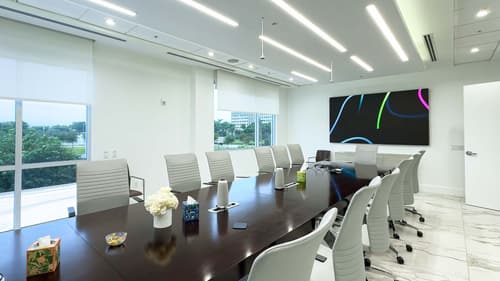
Large conference rooms typically seat a dozen or more people and stretch well beyond 20 feet in length. In these expansive spaces, standard huddle-room equipment falls apart almost instantly. Small webcams suffer from optical distortion over long distances, and basic microphones experience extreme drop-off past the first few chairs.
The physical geometry of a long boardroom dictates that a single front-of-room device cannot adequately cover everyone. Instead of one static camera and speaker combo, you need distributed board room video equipment. Separating your microphones and speakers combats acoustic echo and loud reverberation.
Camera Optics and AI-Driven Auto-Framing

Deep spaces require true Pan-Tilt-Zoom setups to capture details at the far end of the room without heavy pixelation.
The Power of Optical Lenses
Optical zoom physically adjusts the glass lens to magnify an image, keeping the resolution perfectly clear. For deep corporate spaces, you typically need an optical zoom of at least 12x or 15x. Basic wide-angle lenses used in small rooms rely on digital zoom, which immediately degrades the picture quality.
Supporting Meeting Equity
Meeting equity solutions mean every participant has an equal presence on screen, regardless of where they sit in the room. Modern setups utilize active speaker tracking and auto-framing to dynamically adjust the shot. Some smart cameras even generate picture-in-picture gallery views. This allows remote participants to read facial expressions clearly instead of staring at a wide shot of tiny figures.
Distributed Audio Architecture for Boardrooms

Front-of-room soundbars simply do not push enough volume or capture enough sound for large boardroom acoustics. You need to deploy expansion microphones to pick up voices clearly at the far end of the table. Your main options include conference room microphone arrays mounted in the ceiling or daisy-chained tabletop mic pods.
A dedicated Digital Signal Processor cleans up the incoming sound before it reaches your remote guests. This hardware manages critical tasks like ambient noise reduction, voice leveling, and full-duplex audio. Proper processing stops frustrating feedback loops and delivers crystal-clear meeting room audio systems.
Zoom, Teams, and Platform-Agnostic Setup Options

When selecting your hardware, you must choose between dedicated meeting spaces and flexible passthrough models. A dedicated room system includes dedicated compute modules and touch consoles specifically built for Teams room hardware or native Zoom room systems. Native hubs provide major user experience benefits like direct calendar integration for immediate scheduling.
These appliance-based setups offer significant IT management and security advantages while eliminating the need for a personal laptop. Alternatively, BYOD setups use a simple USB connection for platform-agnostic flexibility. Modern modular hubs also flawlessly manage dual display conferencing setups and wireless presentation systems.
The Essential Role of Commercial AV Integration
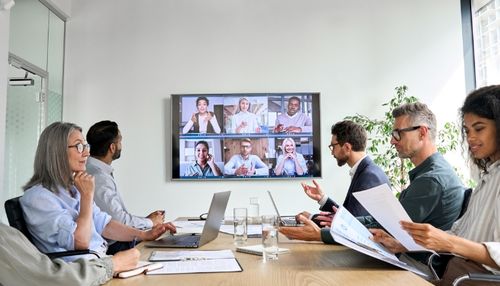
Installing enterprise video collaboration hardware requires professional engineering to function without frustrating user friction. Large-scale boardroom setups involve complex cable management, hidden under-table hubs, and strict power distribution protocols. A professional commercial AV installation is entirely different from a consumer plug-and-play webcam setup.
Always maintain at least a two-inch clearance behind rack-mounted AV hardware to prevent overheating and premature failure of critical network switches. Professional acoustic treatment and strategic microphone placement dictate the final audio quality far more than the hardware box itself. Independent integration teams evaluate your specific acoustics to maximize performance.
Comparing Large Room Video Conferencing Setups
| Feature | Modular PTZ Systems | High-End All-in-One Video Bars |
|---|---|---|
| Ideal Room Depth | These support extremely long rooms exceeding 20 feet. | These are best for small to medium spaces up to 15 feet deep. |
| Audio Expandability | You can infinitely daisy-chain ceiling mics and tabletop pods. | You are typically limited to one or two proprietary expansion mics. |
| Camera Zoom Capabilities | Motorized glass lenses offer true 15x optical zoom without blurring. | Fixed lenses rely heavily on digital cropping that degrades quality. |
| Installation Complexity | This hardware requires professional routing and ceiling grid work. | You can easily mount these directly below your main display. |
| Cable Management Requirements | Extensive structured cabling must run back to a central hub. | A single power and data cable usually powers the entire unit. |
The Pros and Cons of a Modular Video Conferencing System
Investing in a fully modular video conferencing system requires a larger upfront commitment than buying a basic webcam. However, separating your microphones, cameras, and processors delivers vastly superior performance in deep spaces.
Pros
Total Room Coverage
You can place microphones exactly where people sit rather than relying on a distant soundbar.
Pristine Visuals
Motorized optical lenses physically adjust to capture sharp details at the far end of the table.
Platform Native Interactivity
Dedicated hubs support native software for instantaneous one-touch meeting starts.
Flexible Upgrades
You can replace an outdated camera or swap a microphone pod without discarding your entire AV rack.
Cons
Substantial Initial Investment
Buying separate components and processors costs significantly more than a unified bar.
Professional Setup Required
Hiding miles of network cable and calibrating ceiling arrays requires specialized labor.
Upgrade Your Video Conferencing System With DAVE
True meeting equity in a large room requires dedicated enterprise audio solutions and powerful PTZ cameras. Standard huddle room gear simply cannot bridge the gap for remote participants.
Reach out to the commercial AV integration team at DAVE to discuss your next boardroom upgrade. As an independent New York-based integrator, we offer expert showroom guidance, professional installation, and end-to-end IT support for smooth room integration that big-box online retailers simply cannot match.
Frequently Asked Questions About Video Conferencing Systems
For a 20-person space, you typically need three to four strategically placed tabletop microphone pods or two ceiling-mounted arrays. This configuration prevents dead zones at the far corners of the table and captures quiet speakers clearly.
Optical zoom uses physical glass lens movements to magnify the image perfectly, while digital zoom simply crops and artificially enlarges the existing pixels. True optical lenses maintain sharp resolution for faces seated 25 feet away.
Many modern hubs offer simple interoperability features to join third-party meetings as a guest. However, hardware is usually provisioned natively for either a Zoom environment or Microsoft Teams platform for the best one-touch experience.
Ceiling microphone arrays keep the conference table completely clear of wires and physical clutter. Tabletop pods are less expensive to install but are highly susceptible to picking up paper rustling and laptop keyboard typing.
Meeting equity is the concept that remote participants should see and hear in-room attendees just as clearly as those physically present. Smart camera tracking isolates individual faces and frames them equally on the screen so nobody gets lost in a wide shot.
High-definition dual display conferencing setups demand stable, high-speed wired internet connections to prevent latency. Traffic shaping on your corporate network prioritizes video packets over regular web browsing to maintain clear communication.
Why Trust DAVE?
With 25 years of experience in sales, design, and installation, DAVE has built a reputation for quality, expertise, and customer care. Unlike other retailers that rely on subcontractors, our in-house installation teams ensure precision and professionalism in every project. Our non-commissioned sales staff focuses on educating customers—without the jargon—so you can make informed decisions. Through ongoing training and strong vendor relationships, we stay ahead of industry trends, offering the latest technology at the best prices. Plus, with our 30-day price guarantee, you get top-tier service and the lowest price, every time. For expert advice and professional installation in Buffalo and Rochester, New York, visit Dave Digital and take the first step toward transforming your home.